On this page
Meeting Assistant Digital Employee
Start by drafting tasks from meeting action items. Once the task platform is connected, a digital employee can create confirmed tasks, follow up weekly on overdue or blocked items, and archive the records after the owner confirms completion.
General administration, executive offices, and project management teams can use this practice for weekly project meetings, client delivery meetings, and cross-department coordination.
Prepare meeting materials and connect a task platform
- Provide meeting minutes, recording transcripts, and supporting materials.
- The person responsible confirms each action, owner, deadline, and deliverable. Keep tasks in draft if information is missing.
- Maintainers connect and authorize the task platform used for this workflow, such as an existing task board, Feishu, WeCom, an office automation system (OA), Jira, or ZenTao.
From action items to archived completion records
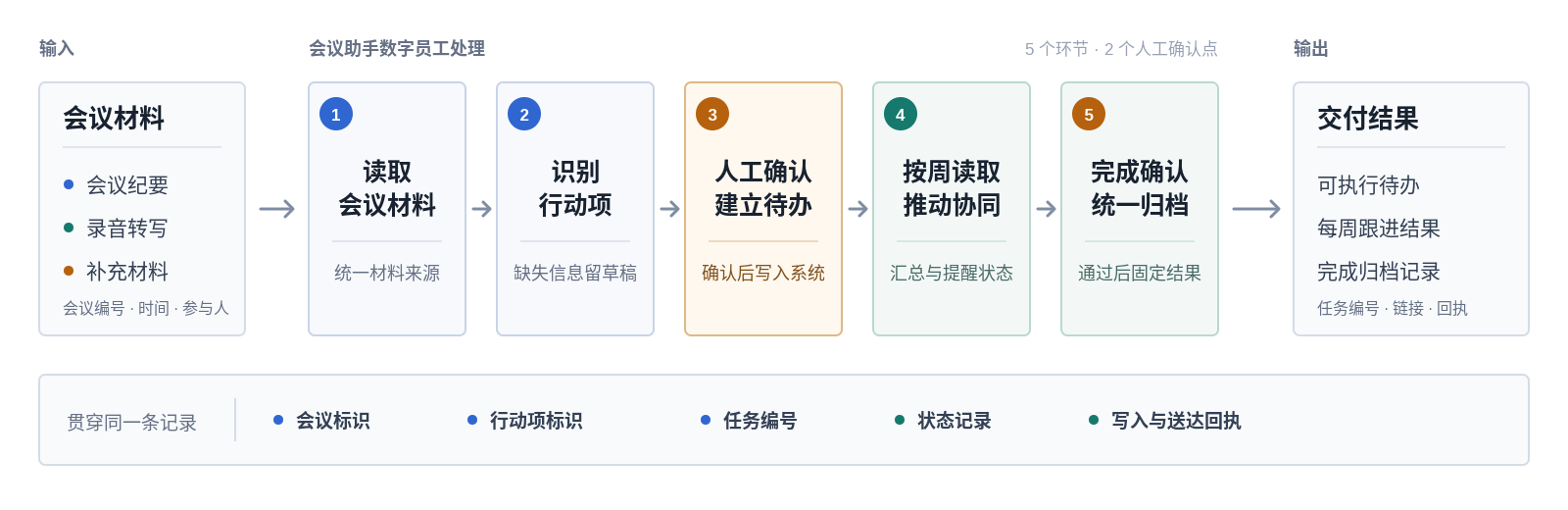
- The digital employee reads the meeting materials, extracts action items, and links them to their sources.
- After the person responsible confirms the drafts, the digital employee creates tasks in the connected platform and retains the task IDs.
- It checks task status weekly, summarizes items awaiting updates, overdue or blocked tasks, and coordination needs, then sends the follow-up to the relevant people.
- Once the person responsible checks the deliverable, the digital employee archives the work history and completion record in the same task.
Deliverables and confirmation
The team receives task drafts, confirmed tasks, weekly follow-up, and archived completion records. The designated people confirm owners, deadlines, and final results. Sending a notification does not mark a task complete.