On this page
Equipment Inspection Digital Employee
Once equipment monitoring data is connected, a digital employee can check equipment status on a schedule, list exceptions, and track their resolution. Operations staff close exceptions after confirming the results.
Information and operations centers responsible for public-sector services, industrial parks, or infrastructure can use this practice for daily inspections, detection of exceptions, and follow-up.
Prepare the inspection checklist and schedule
- Operations staff provide the inspection checklist, equipment status, alert history, and schedule. Specify whether inspections run daily, weekly, or at particular times.
- Maintainers connect the necessary monitoring platform, asset management system, ITSM, office automation system (OA), Feishu, and WeCom.
- Operations staff are responsible for equipment changes, incident response, and approval of exception closures.
From scheduled checks to closing exceptions
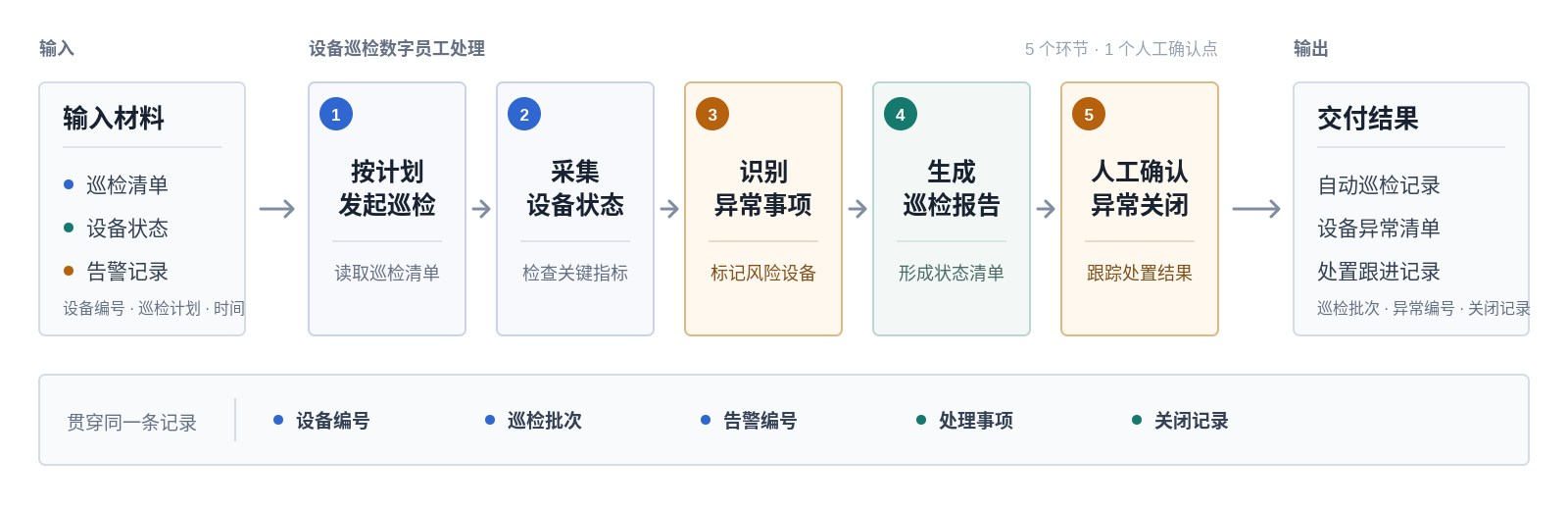
- The digital employee reads the equipment scope for the scheduled inspection.
- It collects online status, key metrics, and recent alerts.
- It identifies offline equipment, degraded performance, and recurring alerts, then lists the affected equipment.
- It creates inspection records and recommendations, opens exception work items, and tracks owners and progress.
- Operations staff confirm the outcome and close the exceptions. The digital employee keeps a record of follow-up.
Deliverables and confirmation
The operations team receives inspection records, an equipment status list, exception work items, and follow-up records. Logging an exception does not resolve it. Final closure requires confirmation by operations staff.