On this page
Knowledge Center
Knowledge Center processes materials into searchable source documents and chunks. Search results are filtered by the current identity's knowledge permissions.
Product boundaries
The Library handles file editing and version management. Knowledge Center parses and retrieves content. Adding a Library file to knowledge creates a knowledge document and a processing job. Later Library revisions do not automatically update the knowledge index.
Global Search returns excerpts from source documents. After the “Knowledge base” connector is enabled, a digital employee can retrieve material in chat according to the current user's permissions and use it in an answer.
Page layout
| Entry point | Purpose | Access limit |
|---|---|---|
| Knowledge bases | Browse personal and shared materials and folders. | Current membership and effective grants. |
| Global Search | Retrieve source excerpts across the selected scope. | Filters document permissions first and does not expand the scope. |
| Knowledge tasks | Track asynchronous processing, review, and deletion. | Jobs accessible to the current identity. |
| Activity Log | Review knowledge operations and results. | Administrators or people with the relevant knowledge base management scope. |
| Enterprise knowledge base management | View knowledge bases within the organization governance scope. | Management access does not grant permission to read full content. |
| Knowledge Service in the admin console | Configure tenant models, parsing, and retrieval services. | An administrator setting, separate from the ordinary search workflow. |
Knowledge base structure
| Object | Purpose |
|---|---|
| Space or group | Organizes personal or shared knowledge. |
| Knowledge base | Stores its description, members, content, and index binding. |
| Folder | Organizes the directory. |
| Knowledge document | Stores its source, content, and processing state. |
| Chunk | The unit of retrieval. |
| Job | Runs asynchronous work. |
Content managed by a source app is maintained in that app.
Knowledge base scope and status
Only the owner can see a personal knowledge base. A user can create more than one. Shared knowledge bases grant access by individual, department, or organization. Older knowledge bases retain their original access restrictions.
Active knowledge bases can be processed and searched with the required permissions. Existing archived knowledge bases remain read-only and are excluded from search and writes. Current knowledge base settings do not provide archive or unarchive actions.
Document processing
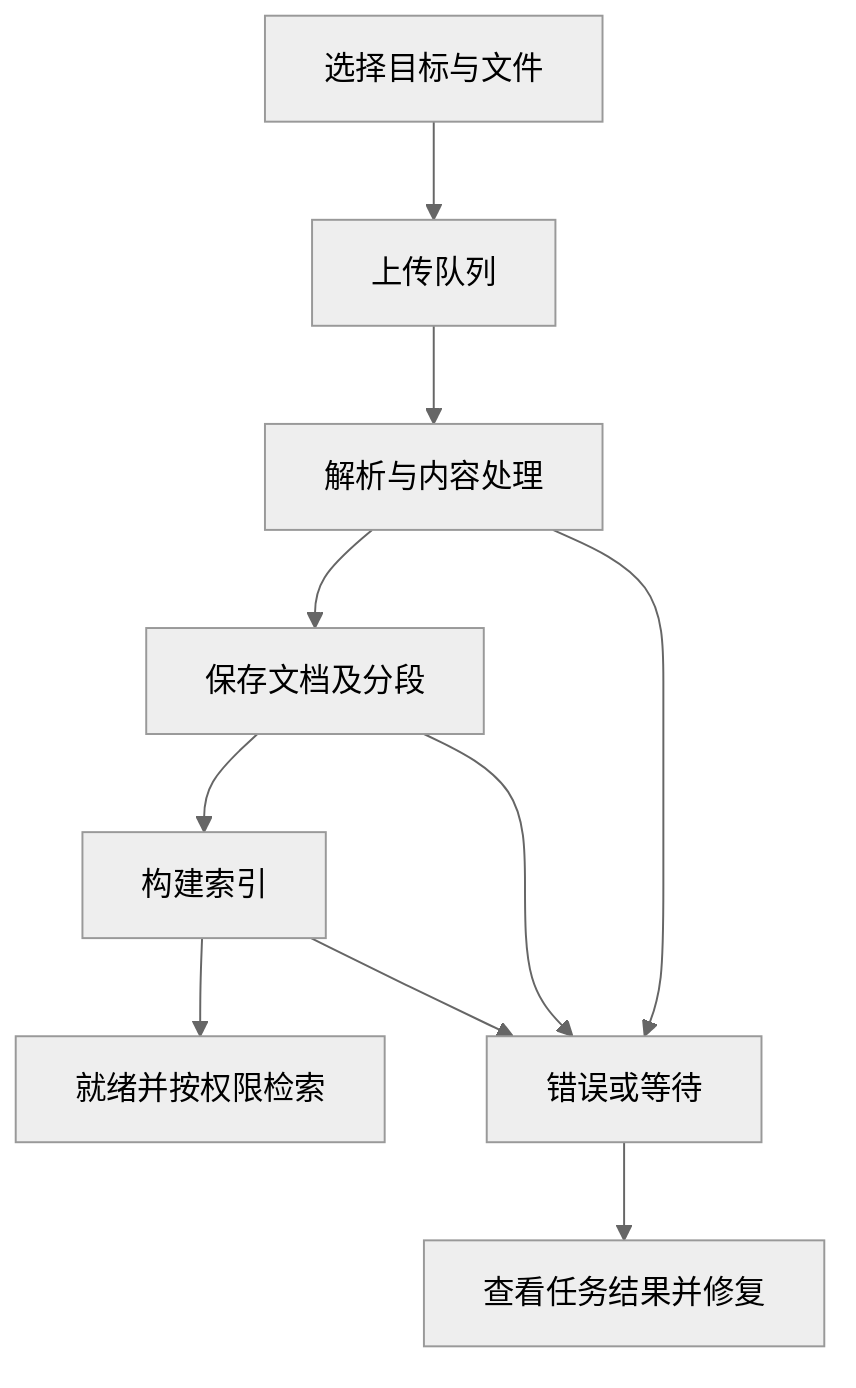
A job may continue in the background after a cancellation request or timeout. Check the final result in “Knowledge tasks” before deciding whether to retry.
File requirements
The upload queue shows allowed extensions, the per-file size limit, and the number of files permitted in a batch. Imports from the Library use the file ID and revision to identify the source version.
For a duplicate name, choose to skip, rename, or replace. Replacing updates the existing content.
Document processing capabilities
Uploads, replacements, and reprocessing in all knowledge bases use the admin “Document processing” settings. Changing those settings does not reprocess existing files.
See Document processing options for the scope and model dependencies of image understanding and OCR.
Knowledge models
Before a knowledge base can be created, an administrator must save a global Embedding model under “Knowledge Service → Model selection”. New knowledge bases use that model. Existing knowledge bases keep their original index bindings.
See Model references for Embedding, Reranker, and OCR configuration and use.
Before changing a model for an existing knowledge base, check Technical Support for supported procedures for your release. Verify compatibility of model weights, versions, dimensions, and normalization.
Changing the global model does not automatically migrate existing knowledge bases. Index states include Ready, Rebuild Required, Rebuilding, and Failed.
Search modes
Keyword search suits reference numbers, names, and exact phrases. Semantic search finds similar meanings with different wording. Hybrid search combines full-text and vector results. Scores and thresholds describe the current retrieval rules; they do not measure answer accuracy.
Retrieval parameters
Global admin settings control full-text weight, vector weight, result count, confidence threshold, and reranking for all knowledge bases. See Retrieval settings for values and effects.
Note
The similarity input for a single retrieval test ranges from 0–2, which differs from the global confidence scale. Do not compare their thresholds directly. Test queries do not permanently modify global settings.
Search result structure
A result contains the source document, matching passage, location, and score. Page, table, and paragraph locations depend on the parsed content. Open the source document to check the passage if location details are missing.
Knowledge access permissions
Knowledge base members can be owners, administrators, editors, or viewers. Permissions separately govern reading, searching, editing, managing members, and deleting. Older content may still have access limited to basic information or management browsing.
Membership can come from direct grants, department or team grants, or organization-wide grants. Removing a direct member does not remove other effective grants. Selecting a department can include lower departments and future members. Expanding the department into individual grants covers only the people included at the time.
Enterprise knowledge base management lists the name, file count, last update, owner, and “My role” for each knowledge base. Platform administrators check “My role” for write permissions. A plugin-managed knowledge base being visible does not mean its contents can be edited directly.
Older knowledge bases and files may continue to use inherited or independent access control lists (ACLs). Inherited access follows the knowledge base. An independent file follows its own restrictions. Changing knowledge base members does not automatically grant access to that file.
The current document detail page has no independent permission editor. Knowledge base maintainers cannot edit legacy independent grants there.
Management browsing shows governance information. It does not grant access to full content. Do not use exports or external services to bypass source access restrictions.
Document details
| Tab | Contents |
|---|---|
| Original file | The downloadable source. |
| Parsed content | Current chunks and available management actions. |
| Information | Document details and processing results. |
| History | Past revisions. |
Historical source file versions are available for download only. They are excluded from current search and question answering.
Document details include name, source, uploader, status, character and chunk counts, creation and update times, and original metadata. Metadata varies by source and processing workflow.
Downloading the original, editing information, reprocessing, and deleting require separate permissions.
Chunk management
A chunk contains content, a title, a page number or sequence number, an update time, and other details. Maintainers with document edit permission can add, edit, enable, disable, or delete chunks. A read-only preview from a retrieval test does not allow edits.
Chunk content cannot be empty. Saving updates the chunk in the search index. Deleting removes both the chunk and its index entry and cannot be undone.
Editing a chunk does not rewrite the source file. Chunk identifiers can change after processing.
Job statuses
| Status | Meaning |
|---|---|
| Queued or running | Waiting for resources or processing. See the result for the current stage. |
| Awaiting my action | The current identity must add information or confirm. |
| Completed or partially completed | The result of the job. Check each item after a partial completion. |
| Failed or failed after retries | Review diagnostics and attempts before fixing the issue. |
| Canceling or canceled | Requesting a stop and reaching the canceled state are separate. Some content may already have been saved. |
Processing stages include waiting for Knowledge Service, reading the source, converting the format, parsing, enriching, saving, and indexing.
If you see a format compatibility fallback warning, check the text in “Parsed content” under document details.
Integrating an external client
The legacy MCP access token entry has been removed from Personal Settings. Digital employees use the built-in knowledge base connector. Search is still limited by effective knowledge base permissions.
For a custom integration using available platform APIs, check scope and execution identity in API Token permissions.
Usage and audit
Hit count and latest hit time record when searches returned material. Activity logs record the action, actor, result, and time. See Audit Center for audit access scope and full-content permissions.
How digital employees use knowledge
Digital employees use knowledge through the built-in “Knowledge base” connector. The connector must be available to both the tenant and the target digital employee. Uploading and processing a file does not grant digital employee access to it.
| Setting or tool | Purpose and limits |
|---|---|
| Connector “Knowledge base scope” | Limits the knowledge bases the digital employee can search after enabling the connector. The caller's permissions still apply. |
| “Specify knowledge bases” in chat | Narrows knowledge scope for the current conversation. It cannot expand the connector's scope or grant permission. |
knowledge_search | Returns matching passages, source documents, and citation URLs. |
knowledge_statistics | Returns knowledge statistics. It does not retrieve source content. |
The built-in service uses platform authentication. When a digital employee calls it, the server checks the current caller and that caller's knowledge permissions. A shared digital employee does not inherit the creator's personal knowledge permissions.
For procedures, see Let digital employees use knowledge bases.
Limits and exceptions
Archived documents and documents not yet ready are excluded from search. The upload queue shows file transfer errors. “Knowledge tasks” shows parsing and indexing errors. For errors following a model change, check index status too.
For procedures, see Knowledge Center. For configuration, see Knowledge Service.